Why secrets handling matters
Most CI leaks are config mistakes, not attacks
Hey, want to stop leaking credentials in your pipelines? Most secret leaks in CI are not the result of some clever attacker. They happen because a key got pasted into a plain environment variable, echoed into a log, or left sitting in repo settings for two years with no rotation. GitHub Actions gives you good tools to avoid all of that, but only if you use them on purpose. Handling config the right way is mostly about scoping secrets tightly and never letting them touch a log.
A workflow runs with real access
A workflow is a program that runs with production credentials. It talks to your cloud, your registry, and your deploy targets, often with credentials that can do real damage. Anyone who can open a pull request can trigger workflows, and anyone with repo access can read your logs and artifacts. That means the way you store and pass secrets is a security boundary, not a convenience setting.
The problem with sloppy config
What’s the issue?
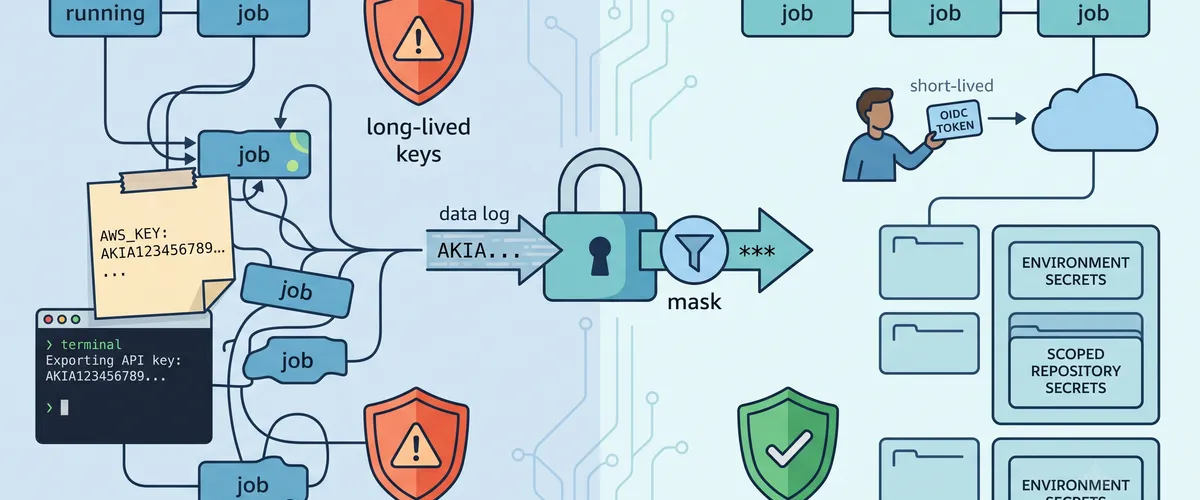
The usual pattern is to dump every secret into repository settings and reference them everywhere. Long-lived AWS keys, database passwords, and API tokens all live in one flat pile with no scope. Then someone echoes a variable to debug a failing step, or passes a secret to a job as a plain artifact, and now that value is sitting in the log output where it stays for as long as the run is retained.
Real-world consequences
Once a secret lands in a log or an unmasked output, treat it as compromised. Logs get shared in bug reports, artifacts get downloaded, and forks can sometimes see more than you expect. Long-lived credentials make it worse because a leaked key stays valid until someone remembers to rotate it, which is usually after the incident. A single careless echo can mean an emergency key rotation across every service that used it.
Scope, mask, and go short-lived
Here’s how to fix it
Fixing this comes down to three habits. Scope secrets so each one is only visible where it is actually needed, mask any sensitive value so it never renders in a log, and replace long-lived cloud keys with OIDC so your workflow gets a short-lived token instead of a permanent credential. Do those three things and most of the ways a secret can escape are closed.
Implementing it
Start with scope. Repository secrets are for values shared across the whole repo, while environment secrets are tied to a specific environment like production and can sit behind required reviewers. For cloud access, use OIDC instead of stored keys.
jobs: deploy: runs-on: ubuntu-latest environment: production permissions: id-token: write # required for OIDC contents: read steps: - uses: aws-actions/configure-aws-credentials@v4 with: role-to-assume: arn:aws:iam::123456789012:role/deploy aws-region: us-east-1No AWS keys are stored anywhere. The workflow requests an OIDC token, AWS trusts it, and hands back short-lived credentials that expire when the job ends. If you do generate a secret at runtime, mask it right away with echo "::add-mask::$TOKEN" so it shows up as *** in the log.
Tools and platforms
The core tools are built into GitHub Actions: repository secrets, environment secrets with protection rules, and the ::add-mask:: workflow command. For cloud auth, the official aws-actions/configure-aws-credentials, google-github-actions/auth, and azure/login actions all support OIDC. For a deeper audit, tools like gitleaks or trufflehog can scan your history for secrets that already slipped through.
Quick implementation steps
Quick takeaways to lock down your config:
- Use repository secrets for shared values and environment secrets for per-stage keys.
- Put sensitive environments behind required reviewers for a manual gate.
- Swap long-lived cloud keys for OIDC with a scoped IAM role.
- Mask any runtime-generated secret with
::add-mask::before using it. - Pass secrets between jobs through masked outputs, never plain artifacts.
- Pass secrets into composite actions as explicit inputs.
Mind the composite action gap
Composite actions do not automatically inherit the secrets of the workflow that calls them. If your composite action needs a token, you have to pass it in as an input from the caller. Forgetting this leads to confusing empty values, and the fix is not to loosen anything, just to wire the secret through explicitly.
Never echo to debug
When a step fails, the temptation is to print the variable to see what it holds. Do not do that with anything sensitive. Use ::add-mask:: first, or check the length and a hash instead of the raw value. A masked value stays masked even if you accidentally print it later in the same run.
Benefits of doing it right
Why it helps
You shrink the blast radius of any single mistake. Scoped secrets mean a leaked value only affects one environment. OIDC means there is no permanent key to steal in the first place, since tokens expire in minutes. Masking means a careless log line does not turn into an incident. Each habit is small, but together they take most credential leaks off the table.
Less rotation, less panic
Long-lived keys are a standing liability that someone has to remember to rotate. OIDC removes that chore entirely for cloud access, because there is nothing stored to rotate. Environment protection rules add a human checkpoint before production secrets are ever used, so a bad change cannot quietly deploy itself. The result is fewer 2am rotations and a lot less guessing about who could have seen what.
What’s your approach?
Community discussion
What’s your take? Secrets handling is one of those things that feels fine until the day it very much is not. If you have moved a pipeline from stored cloud keys to OIDC, how did the rollout go, and did it simplify your rotation story as much as you hoped?
Share your experience
If you have a favorite pattern for scoping secrets across a lot of environments, or a tool that caught a leak before it shipped, I would love to hear it. Especially how you handle secrets in reusable and composite actions without turning every caller into boilerplate.